

ToolXStack
Offline toolbox · Android 13+ · Apache-2.0
216 tools. Zero network permissions.
JSON and JWT, hashes and regex, unit and loan calculators, colour tools and more, in one fast app. ToolXStack has no internet permission at all, so what you paste never leaves your phone.
- Tools
- 216
- Categories
- 10
- Network permissions
- 0
Why ToolXStack
One app instead of a drawer of ad-heavy single-purpose apps and web converters that see everything you paste.
Nothing can leave
The release build strips Android’s
INTERNETpermission, so the system itself refuses any network request. A test in the build checks it stays that way.Works anywhere
On a flight, underground or in a locked-down data centre. Every tool runs on your phone with no connection.
Everything in one place
57 developer tools, 32 unit converters, 22 finance calculators and more, behind one search that understands
emi,b64anddob.Learn as you go
Each tool has a short article with the formula and a worked example, plus 37 offline guides on HTTP, regex, cron, Git, hashing and more.
Fits every screen
Phones, foldables, tablets and Chromebooks. Wide screens get two panes, and a keyboard works: Enter runs a tool, Escape closes a sheet.
Free, with no catch
No ads, no in-app purchases, no pro tier and no account. Apache-2.0 on GitHub.
216 tools in 10 categories
The tools developers reach for every day, next to the calculators everyone else needs.
- JSON, XML and YAML: format, minify, validate, convert, and query with JSONPath.
- JWT: decode, inspect claims and check expiry, without pasting a token into a website.
- Hashes and HMAC: MD5, SHA-1, SHA-256, SHA-384 and SHA-512, checked against published test vectors.
- Text: diff, regex tester, find and replace, SQL formatter, case converters and counters.
- Finance: EMI with a full amortisation table, SIP, CAGR, GST, FD and RD.
- Colour: HEX, RGB and HSL, harmonies, and a WCAG contrast checker.
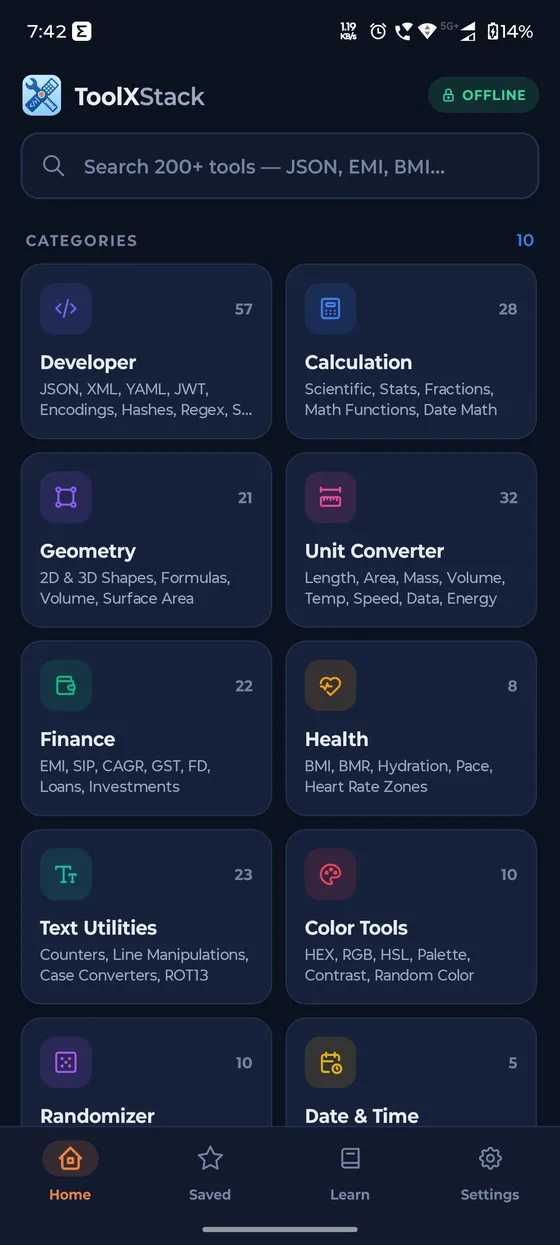
- 57DeveloperJSON, XML, YAML, JWT, hashes, regex
- 28CalculationScientific, stats, fractions
- 21Geometry2D and 3D shapes, volume
- 32Unit ConverterLength, mass, temperature, data
- 22FinanceEMI, SIP, CAGR, GST, FD
- 8HealthBMI, BMR, hydration, pace
- 23Text UtilitiesCounters, case, line tools
- 10Color ToolsHEX, RGB, HSL, contrast
- 10RandomizerDice, coin, picker
- 5Date & TimeAge, duration, time zones
Your data stays on your device
ToolXStack collects nothing, because it can’t send anything. The privacy policy is short for a reason.
Read the privacy policy- Blocked by Android, not by promiseNo
INTERNETor network-state permission. The only permission is vibrate, for haptics. - No analytics or crash reportsNo tracking SDKs and no behaviour logging.
- Your inputs are never savedFavourites and recents keep only tool IDs and times, never what you typed.
- Clipboard only when you tapToolXStack reads or writes the clipboard only when you press a button.
Install in a minute
ToolXStack is shared on GitHub rather than an app store, so there is no store account and no store tracking.
- Download the APK
Open the latest release on your phone and download the
.apkfile. - Allow the install
Tap the file. If Android asks, allow your browser or file manager to install apps, just this once.
- Check it, if you like
Each release has a SHA-256 checksum. Run
sha256sum -c ToolXStack-vX.Y.Z.apk.sha256to confirm your download is the published file.
Questions
Does it really work without internet?
Yes. Every tool runs on your phone, and the app has no permission to use the network at all.
Is anything I paste stored?
No. Favourites and recents store only which tool you used and when, never your inputs or results.
Why is it on GitHub and not the Play Store?
Releases on GitHub come with a SHA-256 checksum for every build, so you can check exactly what you install, and there is no store in between collecting data.
Which Android versions are supported?
Android 13 (API 33) and newer, on phones, foldables, tablets and Chromebooks that run Android apps.
Is it really free?
Yes. ToolXStack is free and open source under Apache-2.0, with no ads, subscriptions or in-app purchases.
How do I report a bug or ask for a tool?
Open an issue on GitHub. Pull requests are welcome too.
Your whole toolbox, with nothing phoning home.
Free and open source under Apache-2.0. Every release is a signed APK with a SHA-256 checksum next to it.